
Owner’s Command Center
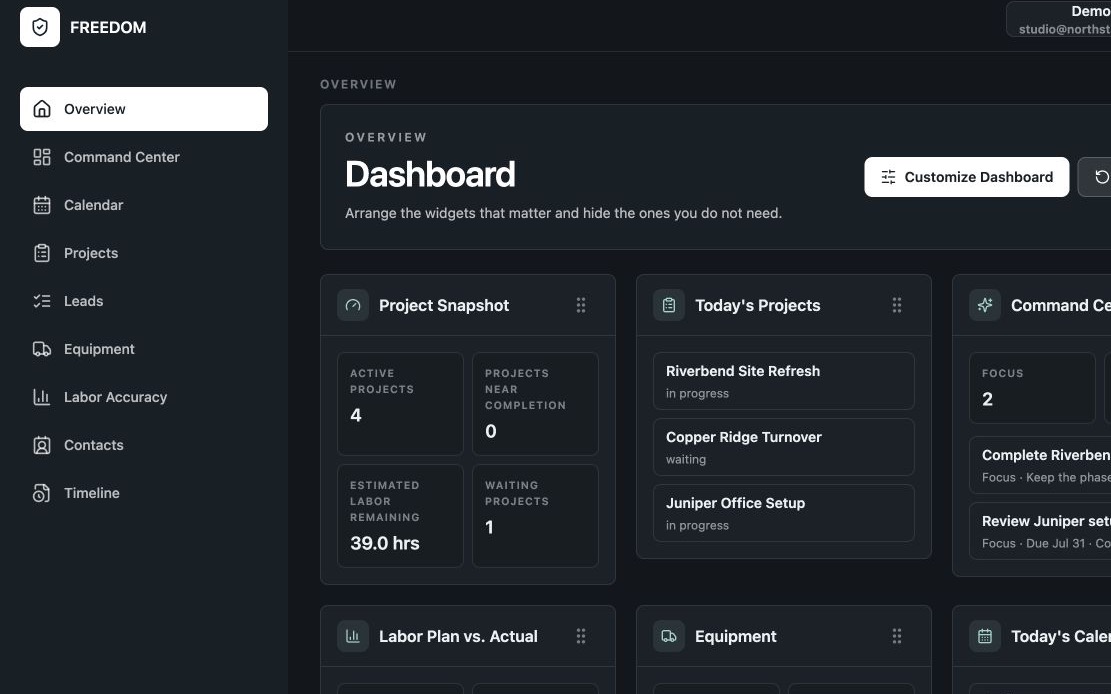
Keep Focus, Waiting, Triggers, and Operating Procedures visible in the owner’s daily operational dashboard.
FREEDOM — Business Operations Software
FREEDOM is business operations software that brings projects, customers, leads, schedules, equipment, field operations, and multiple businesses into one focused application—so you can operate with clarity instead of carrying the whole business in your head.
FREEDOM runs the business. Your specialized software continues doing what it does best. Windows and Android users can access FREEDOM through the web.
Third-party profiles



Built around the owner’s day
Keep Focus, Waiting, Triggers, and Operating Procedures visible in the owner’s daily operational dashboard.
Run multiple companies from one sign-in while keeping each business’s projects, customers, schedules, and operating history distinct.
Keep projects, leads and customers, schedules, equipment, and field work connected to the operational history behind them.
One operational home
Whether you manage projects, properties, clients, crews, equipment, or several companies at once, FREEDOM gives the work one reliable home.
Straight answers
The full FAQ and troubleshooting library lives in Support.
FREEDOM is business operations software for entrepreneurs and small businesses. It connects projects, customers, leads, schedules, equipment, follow-ups, multiple businesses, and operational history.
No. FREEDOM manages daily operations. Your existing accounting, payroll, invoicing, and reporting tools keep doing their specialized work.
The trial includes full FREEDOM access for 14 days. A valid payment method is required, but $0 is charged today. After the trial, FREEDOM renews at $89/month flat with no per-user or per-seat fees unless canceled. Review every trial step.
See the operating picture
Explore the features, workflows, and clear boundary between FREEDOM and the specialized tools you already use. Calendar Synchronization can connect FREEDOM with Apple Calendar, Google Calendar, Microsoft 365, and Outlook.com so you can view and manage synchronized events from the calendar you already use. Apple calendars require native access on a supported Apple device.
Explore the Product